VineOps: Autonomous vineyard rover platform
Lead product designer on the v2 redesign of an autonomous rover platform for California vineyards. Translated onboard rover data into operational decisions for vineyard managers and crew. End-to-end UX across iPad and mobile.
2025
Year
AgriTech + AI
Category
Figma | Figjam | Miro | Chatgpt
Stack

Problem
A major agricultural equipment manufacturer had built an autonomous rover for California vineyards. The hardware was advanced (onboard cameras, GPS, autonomous navigation), but the software that turns rover data into decisions hadn't shipped. A v1 built by an external agency was never tested with real operators and wasn't tied to the hardware roadmap. The manufacturer needed a v2 designed embedded in the team, with direct access to engineering, product, and California vineyard customers.
Four problems to solve:
Mission complexity. v1 flows had too many steps and unclear paths. Vineyard managers couldn't tell what they were doing or why.
Human and rover handoff. Most operations are sequential (rover scouts, human harvests), but v1 didn't make the handoff visible.
Task assignment. No clear model for who owned which jobs: rover, manager, or crew.
AI scoping. The manufacturer wanted predictive analytics, but the original ambition (a super-agent that knew everything) wasn't engineerable for v2.
Project under NDA. Manufacturer and product name anonymized.
Solution
I led the v2 redesign as sole product designer, partnering with the PM (a former California farmer) and one developer. Shipped September 2025.
The manager iPad app runs operations across multi-farm organizations. Managers set grading thresholds first, since the AI can't generate useful insights until it knows what "ready to harvest" means for their crop. The home page then surfaces farms, active vehicles, and harvest readiness as data builds up. Managers create vehicle jobs (scouting, spraying), the rover executes, and insights appear as heatmaps tied to the grading config. From there, managers create crew jobs or export a heatmap PDF.
The crew mobile app turns those decisions into low-friction tasks for field workers. Tasks surface by location and priority; crew read the brief, navigate, execute, and log progress back to the manager. I delivered the foundational designs and the team shipped this surface after the iPad release.
The interaction model: AI as actor, UI as oversight. Managers set intent and review insights; the system acts and reports. The UI surfaces what needs human judgment (exceptions, overrides, decisions) without drowning users in operational detail.
Deliberately cut from v2: real-time video and collision avoidance, teleoperation, embedded self-service site planning, and the broader AI agent. Each became a smaller, shippable design, covered below.
flagged confusion → drove redesign priorities
Prioritized action items shipped to backlog
Testers across two rounds
Prototype blocks tested
Trade-offs & decisions
Three things we wanted in v2 didn't make it. Each was replaced with a smaller, shippable design, and each replacement is a more interesting story than the original ambition.
Real-time video and collision avoidance → a position-verification UI
The team wanted live camera feeds and onboard collision avoidance so managers could supervise the rover in motion and the rover could self-correct around obstacles. Neither was ready on the hardware roadmap. Cutting them entirely would have left a safety gap: how does the manager know it's safe to start an autonomous operation?
The stopgap: a pre-flight path. Before initiating autonomous scouting, the user steps through UI cues that confirm the rover is in the expected position, oriented correctly, and clear of obstacles in line-of-sight. Slower than real-time avoidance, but defensible, and the kind of design decision that exists because of a hardware constraint, not despite it.

Position verification UI
Embedded self-service site-plan creation → an activation-waiting state
Site plans are GIS maps of the vineyard — rows, blocks, varieties, boundaries. They're typically created by an external GIS company using drone imagery, then handed to the equipment manufacturer. We spent about a month exploring whether the app could let users create their own site plans in-product. It was too complex for the release timeline and would have pushed the engineering scope past what we could ship.
Instead: after a user creates their account and selects their organization, the app enters a deliberate "waiting for activation" state while the external party finishes the site plan in the background. Once it's ready, the account activates and the user lands on the home page. It's an honest seam in the experience — there is a real wait — but framing it as a state rather than a missing feature turned a UX gap into a clear status the user could understand.

Activation message and initial design site-plan creation
A "super AI agent" → harvest readiness, scoped to one decision
The original ambition was a multi-domain AI that surfaced temperature, humidity, disease detection, and harvest readiness all at once, with proactive recommendations across the board. The underlying ML platform actually supports most of this. The engineering effort to surface and reconcile all of it in the UI for v2 didn't.
For v2 we shipped harvest readiness only, scoped to a single decision the user already cared about: when and where to harvest. The system fills with data as the user creates jobs — empty on day one, useful by week three, indispensable by month two. And because the manager configures their own grading thresholds (Class 1, Class 2) before insights surface, the AI's outputs are tied to the manager's definition of "ready," not a generic prediction.
The crew mobile app didn't ship at the same time as the iPad app. The heat map PDF export was the bridge — managers could print out the AI's recommendations and assign crew manually until the mobile app was live. A stopgap shaped by a release sequence, not a missing feature.

Farm manager: AI insights, grading configuration, jobs and heat map
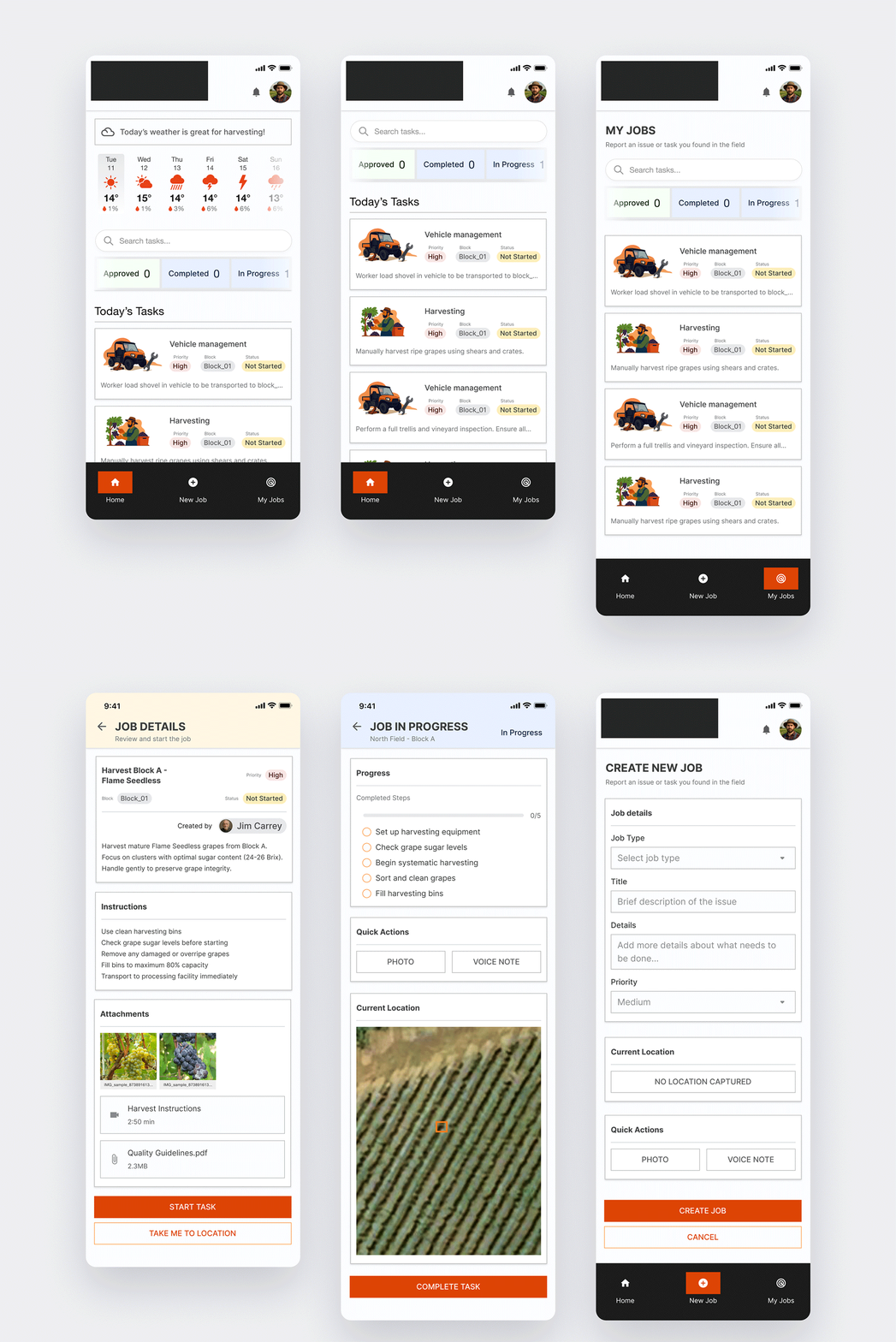
Farmer mobile app main screens

System architecture

Manager decision flow

AI-as-actor, UI-as-oversight roles

Crew app flow
Testing & Iteration
The PM ran multiple rounds of unmoderated Maze testing with fresh participants each round. I designed the plans, analyzed findings, and turned them into iteration decisions.
The final round ran with 10 participants across 24 prototype blocks. Three examples of what we learned:
Testers couldn't tell the system was autonomous. Participants described the app as a generic fleet management tool. "I think we need to make it more obvious that this is meant to be an autonomous data gatherer." The value prop was failing at the UI layer. We rewrote the guided tour, added autonomy framing to empty states, and reworked the home page copy.
Navigation was wrong. Testers reached for actions from the map dashboard, then had to backtrack into Jobs. "Intuitively, I wanted to do that from the dashboard, but I had to go to Jobs." Completion rates hit 100%, but misclick rates ran 33 to 77%, friction we'd have missed from success data alone. We restructured the flow so insights and actions surface from the map.
Grading terminology was jargon. "What is grading?" Vocabulary built with the agronomy team didn't survive new users. We reworked the labels, added contextual help, and rewrote the onboarding.
Nine prioritized items came out of the final round. High-impact, low-effort shipped first (copy, CTAs, terminology). Higher-effort work like the results restructure made it into the same release. One item, the collapsible dashboard sections, was parked: the discoverability cost was real but smaller than the rebuild cost.
Designing for autonomous systems is a different discipline. The interaction model isn't "user gives command, system executes" — it's "user sets intent, system acts, user oversees." Most of the design work was building trust in the system's autonomous behavior without burying the user in operational detail.
The value proposition has to land at the UI layer, or it doesn't land at all. Testers consistently described the app as a generic fleet management tool until copy, onboarding, and empty states were rewritten to reinforce the autonomous nature of the product. The visual design alone couldn't carry the model.
High success rates can hide bad UX. Every task in the final testing round had 100% completion, but misclick rates ran from 33% to 77%. Without watching the navigation overlays and reading open feedback, we would have shipped a product that "worked" but felt frustrating. Quantitative completion data was the least useful signal in the dataset.
Ambition gets scoped at the seams. Real-time video, collision avoidance, teleoperation, embedded site-plan creation, and the broader AI agent didn't ship in v2. Each had a smaller, defensible alternative — a position-verification UI for safety, a "waiting" state for activation, a heat map PDF for crew handoff. The hard part of senior design isn't drawing the ambitious version; it's designing the honest stopgap and explaining why it was the right call 🫠.
Hardware + software design is a coordination problem. The biggest challenge wasn't UI — it was syncing release timelines, firmware capability, and UX expectations across three teams.
Next Steps
v2 shipped in September 2025 with the manager iPad app. The crew mobile app shipped separately afterward using foundational designs I delivered. The platform's broader AI capabilities — temperature, humidity, disease detection — remain on the roadmap as the data layer matures.
Project under NDA — additional context available on request.

That's the end of this project.
Wanna hop to the next?
prototype blocks tested